
Make an Adjustment
Count first, enter the counted number rather than the difference, and pick a reason that will still mean something in a year.
Those three habits are most of what separates a useful adjustment from a mystery.
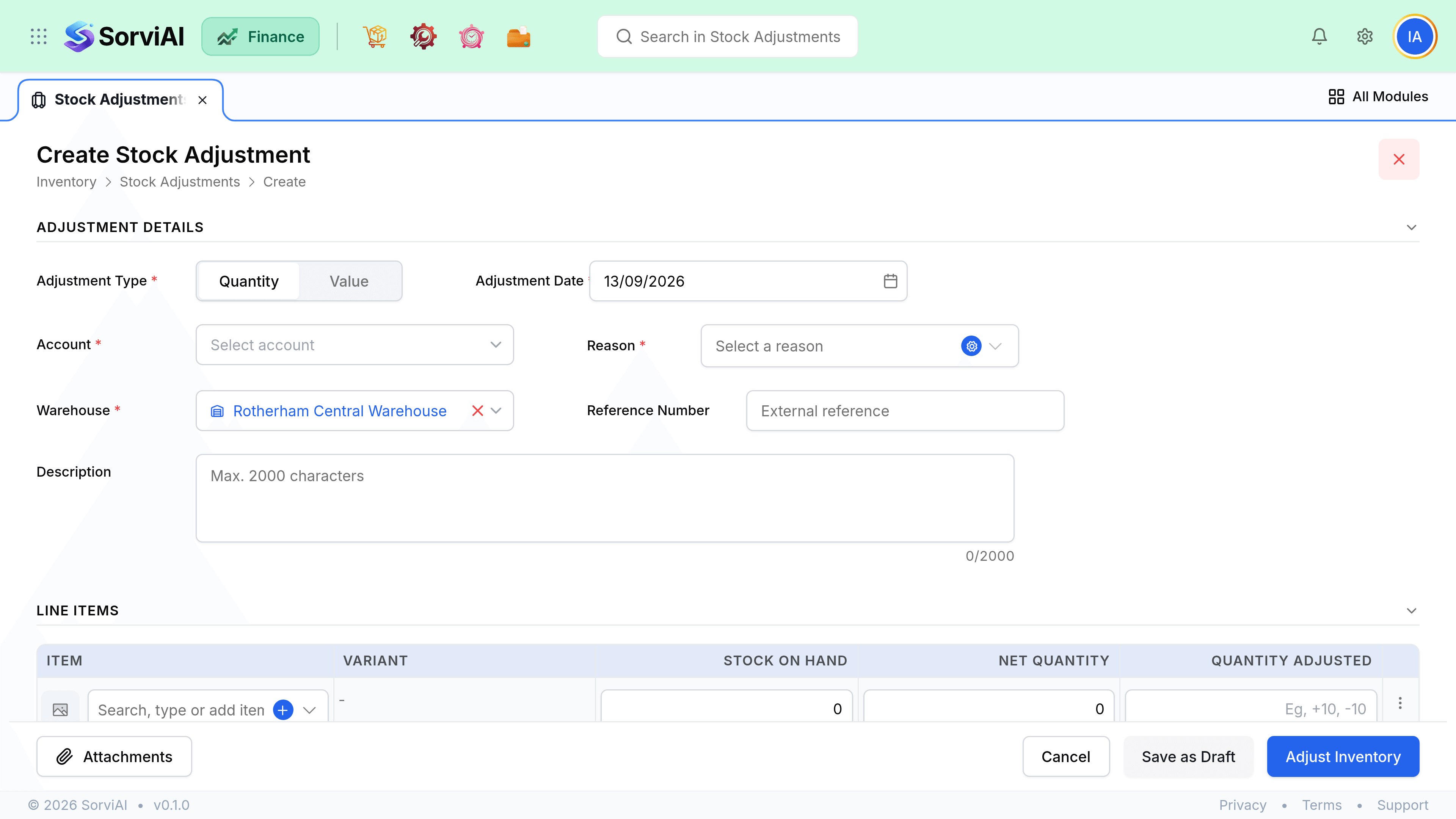
Record an adjustment
Pick the location
Adjustments are always at one location. Do not adjust down at one site to explain a surplus at another; that is a transfer.
Choose quantity or value
Decided per adjustment, not per line.
Add the items and the new figures
Enter the counted quantity, not the difference. SorviAI Finance calculates the movement.
Pick a reason
This is what makes the adjustment auditable later.
Set the account
Where the write-off posts. Usually a cost of goods or shrinkage account.
Save
Stock and valuation both move at this point.
Reason codes
| Reason | Use for |
|---|---|
| Physical Count Discrepancy | A counted difference at a stocktake |
| Stocktaking results | The outcome of a full count |
| Damaged goods | Broken or spoiled stock |
| Stolen goods | Loss you can attribute to theft |
| Stock Written off | Stock that is gone and will not be recovered |
| Found Items | Units that turned up which the system did not know about |
| Expired Items | Stock past its date |
| Obsolescence Reserve | Still there, no longer sellable |
| Inventory Revaluation | A change in what the stock is worth rather than how much there is |
| Initial Stock Setup | Setting stock at go-live |
| System Error Correction | Fixing an earlier entry error |
The account an adjustment posts to is chosen on the adjustment itself, not implied by the reason. The list above is what a new workspace is seeded with; you can add, rename and retire reasons to suit how your warehouse explains itself.
A short list that people actually use is worth more than a long one they guess at. If half your adjustments are coded Correction, the code has stopped meaning anything.
Stocktakes
A full or partial count follows the same route: count, then record one adjustment per location with reason Stocktake. Do it when nothing is moving, because an adjustment recorded halfway through a picking round is a snapshot of a moving target.
- Freeze despatches and receives for the location while counting, or count outside working hours.
- Record every line, including the ones that matched. A zero-movement line is evidence you counted it.
- Investigate the large differences before saving. An adjustment is quick to record and hard to explain later.
- Count variants individually. Each holds its own stock.