
Sales Order Preferences
The richest settings tab in Sales: when an order closes, what the warehouse is allowed to pack, and what carries into the invoice.
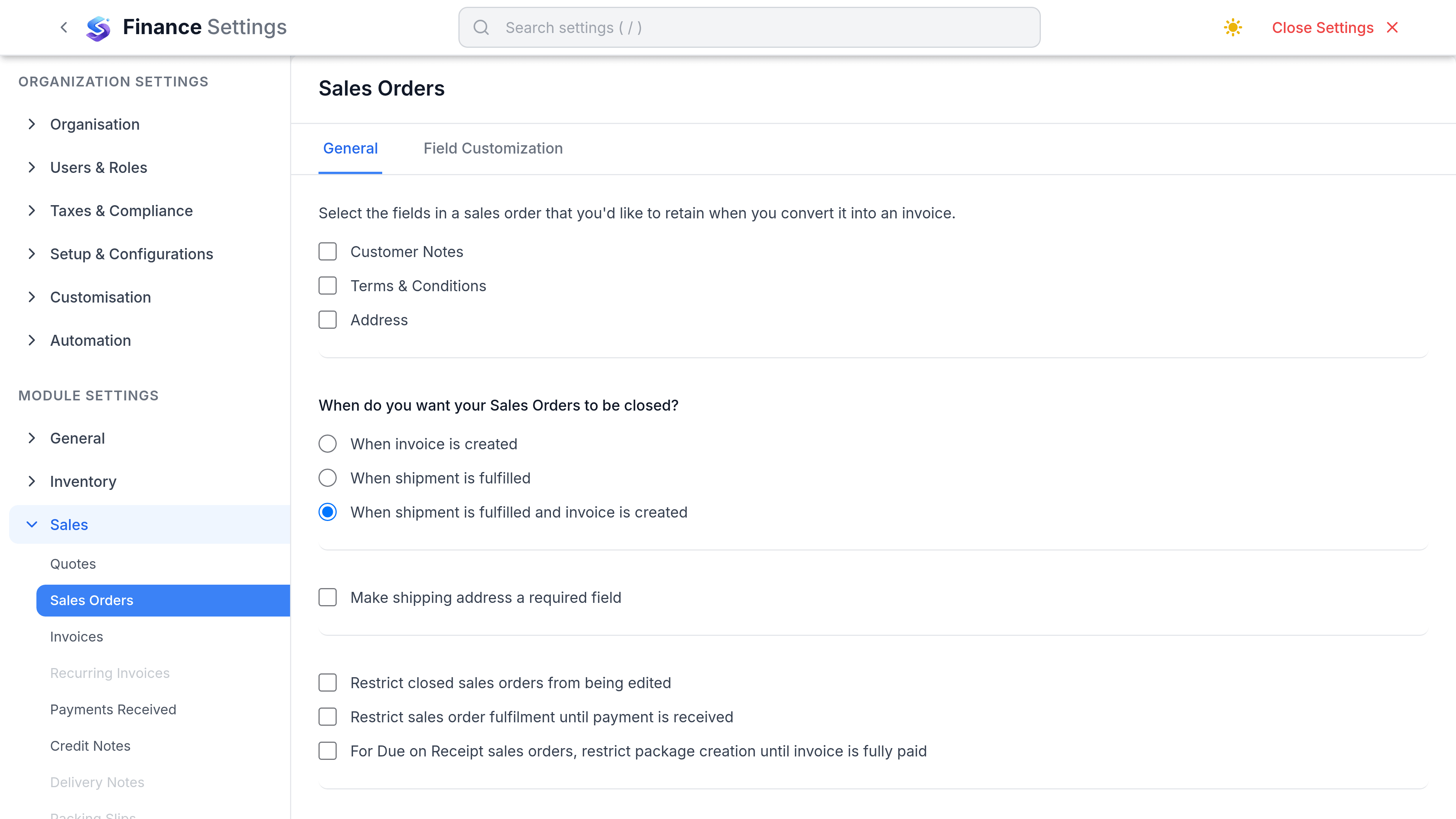
The restrict switches are the ones worth thinking about, because they change what your warehouse is allowed to do.
Settings that matter
Go to SettingsFinanceSalesSales Orders. This is the richest settings tab in Sales, and it is organised as General, Retain on Conversion, Closing & Shipping, Defaults and Field Customisation.
| Preference | What it does | Worth changing when |
|---|---|---|
| Restrict fulfillment until payment | Stops an order being fulfilled before the customer has paid. | You sell to new or risky accounts on prepayment. |
| Restrict package creation for Due on Receipt | Blocks packing an order whose terms are Due on Receipt until it is settled. | Due on Receipt means what it says in your business. |
| Allow package creation for on-hold orders | Lets the warehouse pack an order that is on hold. | Off is the safer default; a hold usually means stop. |
| Restrict editing closed orders | Prevents a closed order being altered after the fact. | Almost always. A closed order is a record. |
| Enable purchase orders | Records the customer's own PO number against the order. | Your customers raise purchase orders. |
| Mark purchase order as mandatory | Requires that number before the order can be saved. | A missing customer PO gets your invoice rejected. |
| When orders close | Chooses the event that closes an order: when the invoice is created, when the shipment is fulfilled, or when both have happened. | You invoice before you ship, or the reverse. |
| Shipping address required | Makes the shipping address compulsory on every order. | You ship physical goods on every order. |
Four Retain on Conversion switches decide what carries across when an order becomes an invoice: Customer Notes, Terms & Conditions, Billing Address and Shipping Address. Defaults holds the terms and notes every new order starts with.
What lives somewhere else
| Expected setting | Where it actually is |
|---|---|
| Numbering series | Real, but not here. Sales order numbering is set with every other document series under the numbering settings. |
| Templates | Real, but not here. Order and delivery note layouts are chosen under Customization, Templates. |
| Require picklist before shipment | Does not exist. Picking is a workflow you choose to follow, not a gate. |
| Require package before shipment | Does not exist as a requirement. What does exist is the pair of restrictions above, which gate packing on payment rather than on paperwork. |
| Default delivery method | Not a setting. Carrier is chosen per shipment. |
| Warn on over-commitment | Does not exist. Nothing flags an order promising stock you do not hold. |
Delivery notes
The delivery note template is separate from the invoice template, because it usually hides prices. It is what goes in the box, so it should show quantities, item codes and the shipping address, and nothing your customer's warehouse should not see.
- Prices can be hidden on the delivery note while staying on the invoice.
- A second template can be chosen per shipment when one customer needs their own format.
- The template carries your logo and terms from the same place the invoice template does.