
Reading the Tiles
Every widget is a live read of another module, and each one deliberately excludes something.
Knowing what is left out is what stops a widget disagreeing with a report from being alarming.
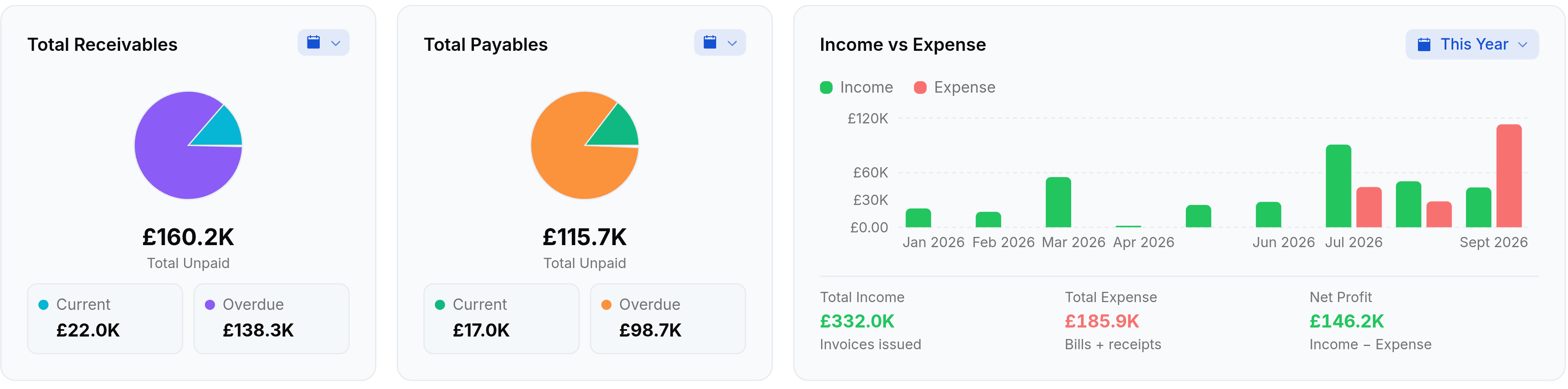
What each widget counts
- Total Receivablesfrom Sales
- The balance still outstanding on invoices you have sent, viewed, part-paid or let run past due. Drafts are excluded because a draft has not been asked for yet.
- Total Payablesfrom Purchases
- The balance still outstanding on bills that are open, part-paid or past due. Purchase orders are excluded until they become bills, since an order is not yet a liability.
- Cash Flowfrom Banking
- Money in against money out over the range, with the current and closing balance beside it. This is the nearest thing on the screen to a cash position.
- Income vs Expensefrom Sales and Purchases
- Invoices issued in the range against bills plus approved expenses, month by month, with net profit as the difference. It counts what was issued, not what was paid.
- Top Expensesfrom Purchases
- Approved expenses only, grouped by the expense account they were coded to. An expense awaiting approval is nowhere on this widget.
The other six are lists rather than totals: Recent Transactions, Open Quotes, Sales Funnel, Quotes Heatmap, Top Customers and Top Vendors. The last three rank by sales-order and purchase-order value, so they count what was agreed rather than what was invoiced.
Current and Overdue come from the due date
The split under Receivables and Payables is worked out from each document's due date against today, not from a status somebody stored. This matters because nothing marks a document overdue on a schedule: a stored overdue status only ever gets written when the record happens to be saved for some other reason. Reading the due date is what makes the split agree with an ageing report.
What is deliberately excluded
| Not counted | On which widget | Why |
|---|---|---|
| Draft invoices | Total Receivables, Income vs Expense | Nothing has been asked for, and nothing has posted. |
| Draft bills | Total Payables, Income vs Expense | An unapproved bill is not yet a liability. |
| Void and cancelled documents | Income vs Expense, Top Customers, Top Vendors | They were undone, so counting them would double-count the replacement. |
| Purchase orders | Total Payables | A commitment is not money owed. |
| Sales orders | Total Receivables | Same reason, in the other direction. |
| Expenses awaiting approval | Top Expenses, Income vs Expense | Only approved expenses post, so only approved expenses count. |
When a widget disagrees with a report
Trust the report. Almost every disagreement between the two is a date range, and the rest is usually one of the exclusions above.
Check both date ranges, not just the report's
Overview carries a range at the top right that drives the whole screen, and each widget's own calendar chip overrides it for that widget alone. Two widgets side by side can therefore be answering two different questions. Picking the header range again, even the same one, pulls every overridden widget back into line, which is the quickest way to get the screen agreeing with itself before you compare it to anything.
Check for drafts in the period
Invisible to both, but they explain why neither matches what your team believes.
Then investigate in the owning module
That is where the filters, the audit trail and the edit actions live.