
Invoice Preferences
The three switches on the Invoices tab, the default text every invoice starts with, and where numbering, reminders and templates actually live.
Invoice numbering is the one setting in Finance worth being careful with, because the sequence it produces is the sequence an auditor will ask about.
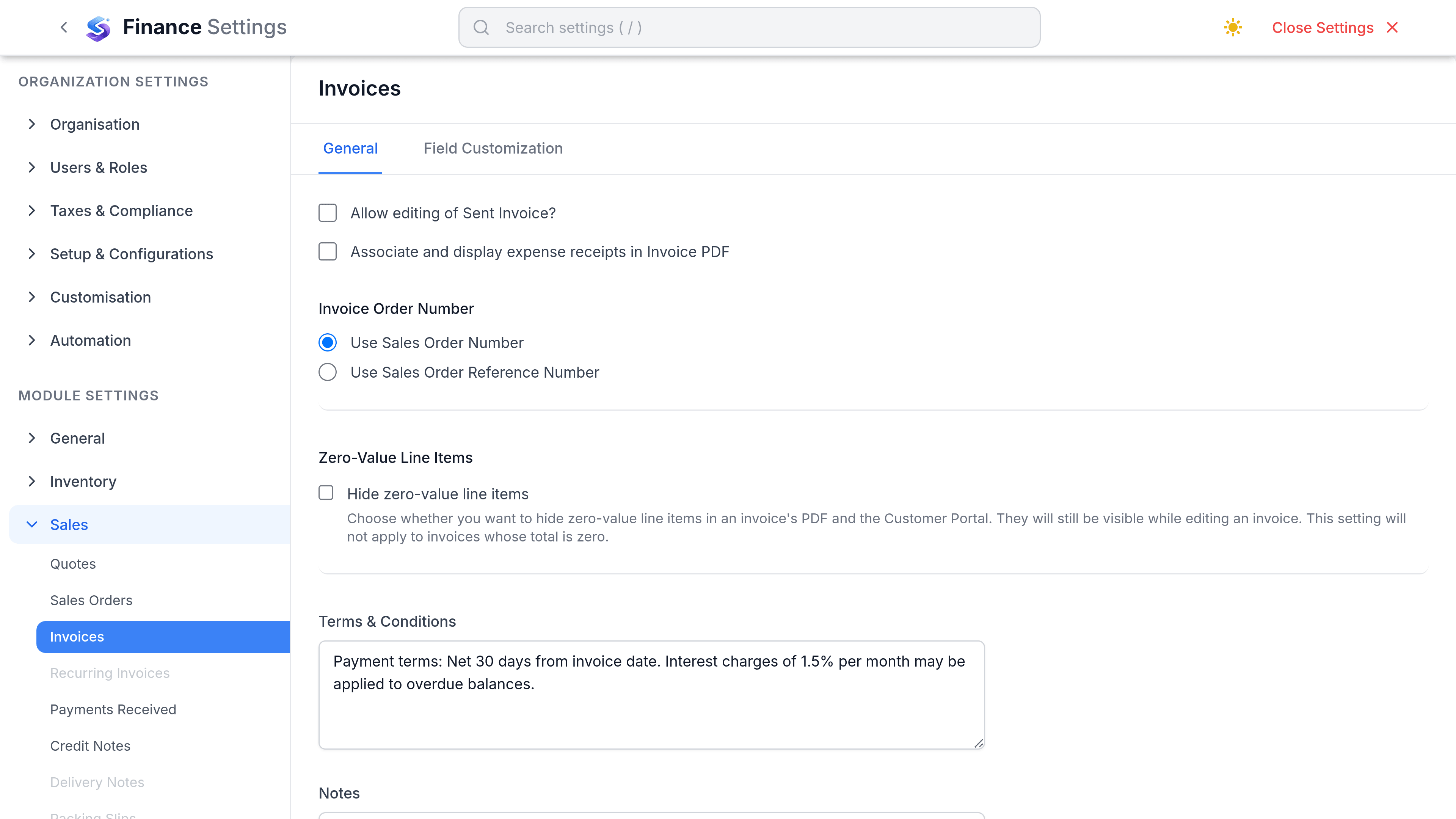
Settings that matter
Go to SettingsFinanceSalesInvoices. The tab splits into General, a Defaults section, and Field Customisation.
| Preference | What it does | Worth changing when |
|---|---|---|
| Allow editing sent invoices | Lets a sent invoice be changed rather than voided and reissued. | Rarely. Leaving it off is what keeps a sent document trustworthy. |
| Hide zero-value line items | Drops nil lines from the PDF. | You itemise inclusive extras the customer should not see priced at zero. |
| Associate expense receipts in PDF | Attaches rebilled expense receipts to the invoice PDF. | You rebill costs and customers ask for the evidence. |
| Invoice Order Number | Where the order number printed on an invoice comes from, such as the sales order number. | Your customers reconcile against their own order references. |
| Default Terms & Conditions | Text printed at the foot of every new invoice. | You paste the same paragraph in by hand today. |
| Default Notes | Text carried onto every new invoice. | You always say the same thing. |
What lives somewhere else
| Expected setting | Where it actually is |
|---|---|
| Numbering series | Real, but not here. Invoice numbering is set with every other document series under the numbering settings. |
| Reminder schedule | Does not exist. Reminder templates do, but nothing sends them on a schedule, so chasing is a manual send from the invoice. |
| Templates | Real, but not here. The invoice PDF layout is chosen under Customization, Templates. |
| Allow portal payment | Real, but not here. What customers can do with a link is set under the portal settings. |
| Default payment terms | One payment term is marked the workspace default and offered everywhere. There is no invoice-specific default. |
| Tax inclusive by default | Not a setting. Tax treatment is chosen on the document. |
Numbering, carefully
Invoice numbers must be unique and should be unbroken. SorviAI Finance enforces the first and helps with the second by refusing to set the next number below one already issued, and by voiding rather than deleting sent invoices.
- Changing the prefix affects new invoices only. Nothing already issued is renumbered.
- A number can be edited on a draft, which is how you slot into a migrated sequence.
- Per-year prefixes such as INV-2026- are common and need updating each year unless you use the year token.
- Credit notes have their own series. Sharing one with invoices makes the invoice sequence look broken.
Templates
The PDF template controls the logo, colours, line columns and footer. One is the default and others can be chosen per invoice, which is how a second brand, a second language or a customer-specific layout is handled.
- Changing a template changes how existing invoices reprint, because the PDF is generated on demand.
- The email template is separate and carries the covering message, with invoice number, amount and due date substituted in.
- The reminder template is separate again, so a chase does not read like a first send.