
Quote Preferences
What a new quote starts as, and the four switches that decide what survives when it converts.
They apply to quotes raised after the change, never to quotes that already exist.
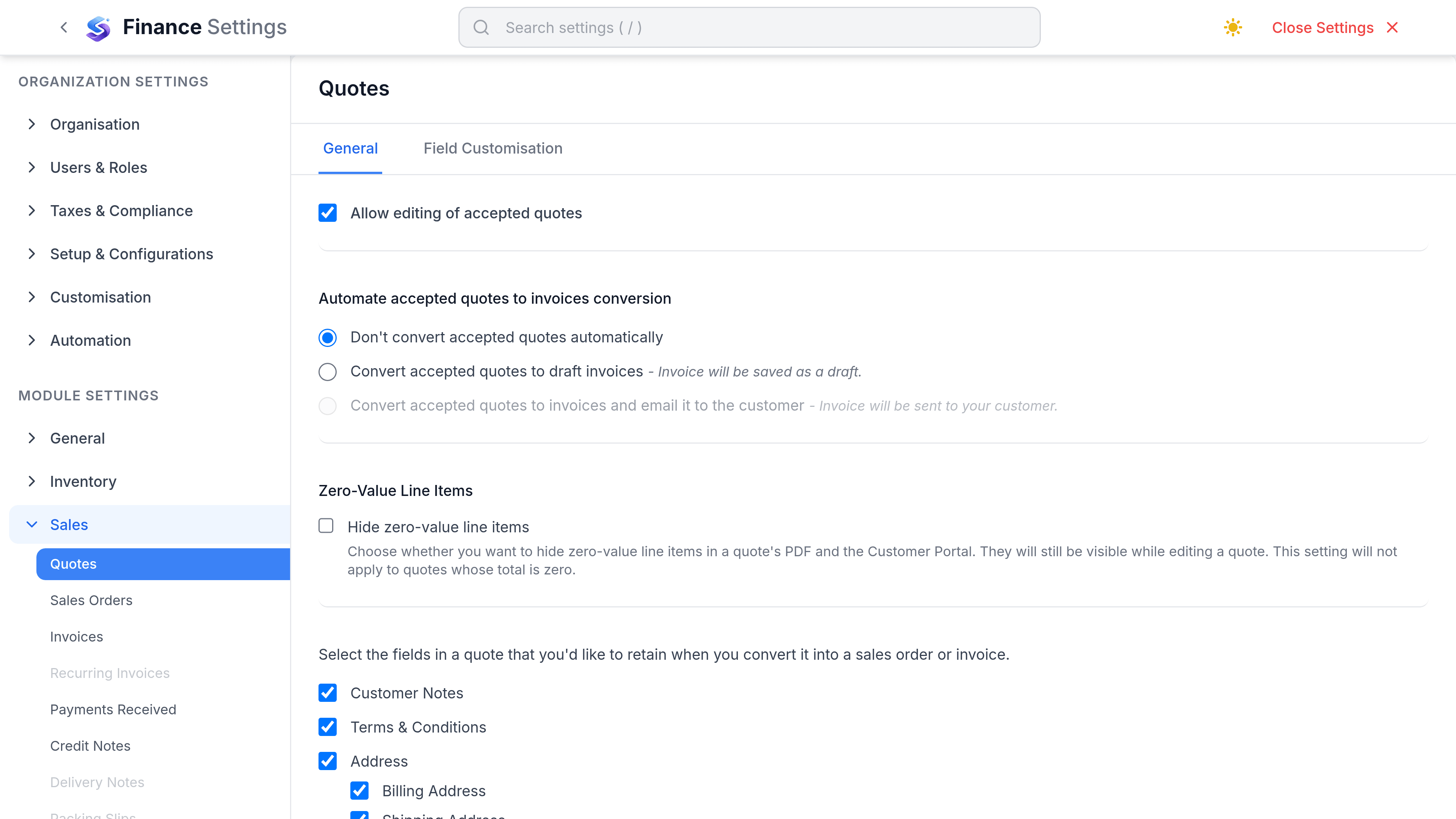
Settings that matter
Go to SettingsFinanceSalesQuotes. The tab splits into General, a Defaults section, and Field Customisation.
| Preference | What it does | Worth changing when |
|---|---|---|
| Auto-convert accepted quotes | Turns a quote into the next document automatically the moment it is accepted. | Acceptance always leads to the same next step and you want no gap. |
| Allow editing accepted quotes | Lets an accepted quote be changed after the fact. | Rarely. An accepted quote is what you agreed. |
| Hide zero-value line items | Drops nil lines from the PDF. | You list inclusive extras the customer should not see priced at zero. |
| Retain notes on conversion | Carries customer notes across when the quote converts. | Your notes are for the customer rather than for you. |
| Retain terms on conversion | Carries terms and conditions across. | Almost always. The terms you quoted are the terms you agreed. |
| Retain billing address on conversion | Carries the billing address across. | Almost always. |
| Retain shipping address on conversion | Carries the shipping address across. | You ship to where you quoted. |
| Default Terms & Conditions | Text printed at the foot of every new quote. | You have standard terms you currently paste in by hand. |
| Default Notes | Text carried onto every new quote. | You always say the same thing. |
What lives somewhere else
| Expected setting | Where it actually is |
|---|---|
| Numbering series | Real, but not here. Quote numbering is set with every other document series under the numbering settings. |
| Template | Real, but not here. The quote PDF layout is chosen under Customization, Templates. |
| Portal acceptance | Real, but not here. What a customer can do with a link is set under the portal settings. |
| Default validity | Does not exist. Valid Until is set per quote, so a quote left blank does not expire on its own. |
| Notify on acceptance | Not a quote setting. Notification behaviour is configured under the notification settings. |
| Tax inclusive by default | Not a setting. Tax treatment is chosen on the document. |
Numbering
Quote numbers are a series, not an identity. They can be changed on a draft, they must be unique, and they do not have to be unbroken because a quote posts nothing to your books. That last part is what makes quote numbering far more relaxed than invoice numbering.
- Changing the prefix affects new quotes only. Existing numbers are never rewritten.
- Setting the next number lower than one already used is refused, because duplicates would follow.
- Auto numbering can be turned off entirely if you type your own references.
The template
The PDF template controls the logo, the colours, which columns appear on the line table and what shows in the footer. One template can be marked as the default and others chosen per quote, which is how a second brand or a second language is usually handled.