
Make an Adjustment
Choose the mode, pick the depot, the account and the reason, then enter the difference.
An adjustment is quick to raise and permanent once applied, so the care goes into the reason and the number rather than the mechanics.
Raise one
Go to Stock Adjustments and select Adjustment
Or use Adjust Stock on the item itself, which fills the item in for you.
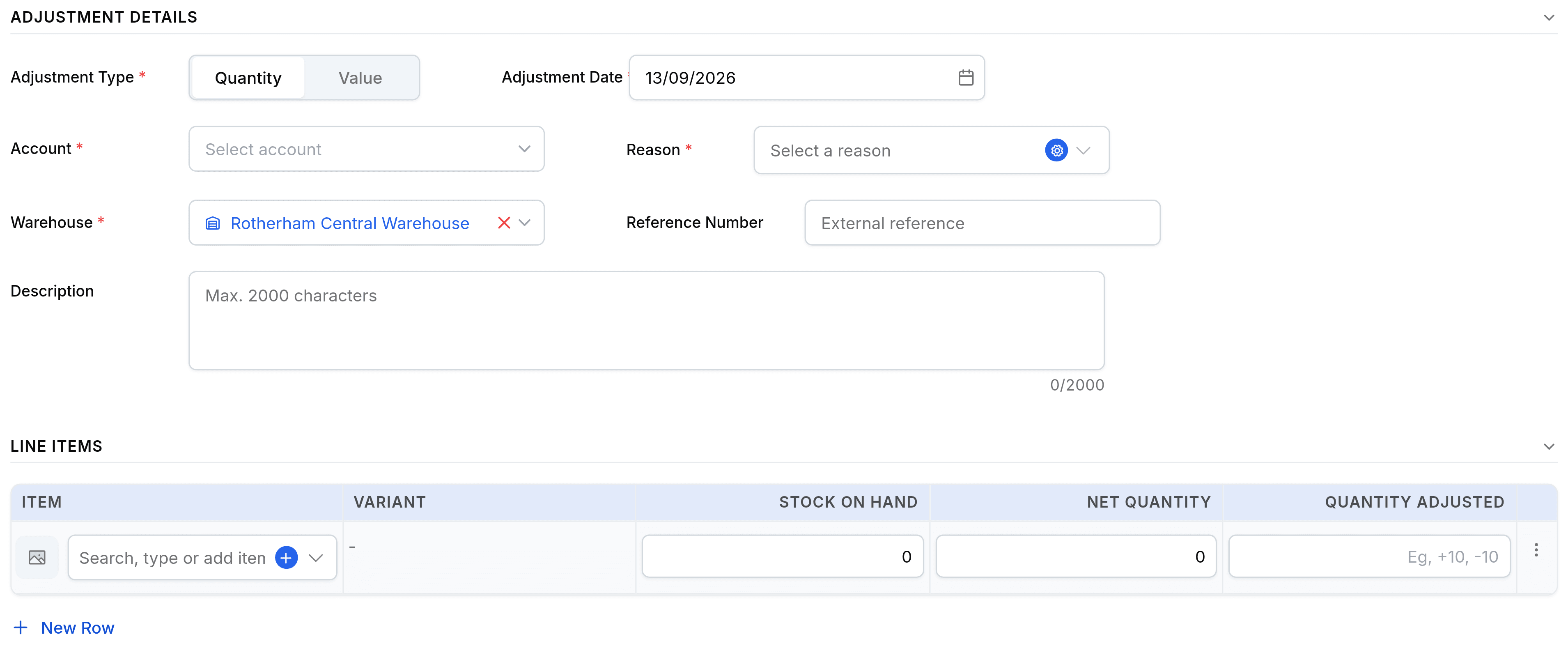
Choose the Mode of Adjustment
Quantity changes the count; Value changes what the units are worth without moving any of them. It applies to the whole document, not to a line.
Pick the account, the reason and the warehouse
All three are required. The account is where the write-off posts, the reason is what makes the total explainable later, and stock is held per depot so an adjustment needs one.
Enter the difference, not the new total
The Quantity Adjusted column takes a signed change:
+10for ten found,-10for ten missing. Quantity Available and Net Quantity on Hand beside it show you what the system currently thinks, so you can work out the difference on screen.Select Adjust Inventory
Save as Draft keeps it as a form and moves nothing. Adjust Inventory applies it.
Choosing the reason
The reason list is fixed, and picking the honest one is what makes the monthly write-off readable.
| What happened | Reason |
|---|---|
| A stocktake or cycle count disagreed | Physical Count Discrepancy |
| A formal audit found a variance | Audit Adjustment |
| Goods broke, or were water damaged | Damaged goods |
| Stock passed its shelf life | Expired Items |
| Units turned up that were never recorded | Found Items |
| Stock written off as unsellable | Stock Written off |
| The starting balance on go-live | Initial Stock Setup |