Stock and Valuation
Tracking makes an item countable; the valuation method decides what those units are worth when they leave.
Both settings are easy to set and awkward to change, so this is about getting them right before the first transaction rather than after.
What tracking changes
Tracking on
- YesA quantity, per warehouse
- YesAppears in stock reports
- YesCan be picked, packed and shipped
- YesCost recognised when it sells
Tracking off
- NoA quantity, per warehouse
- NoAppears in stock reports
- NoCan be picked, packed and shipped
- NoCost recognised when it sells
With tracking on, what you paid sits in stock until the goods sell. With it off, it hits an expense the moment you buy. That difference, rather than the counting, is what makes this an accounting decision.
The two valuation methods
- FIFOfirst in, first out
- The oldest units leave first, so cost of goods follows your oldest purchase prices. Usually the most intuitive, and the closest fit for dated or serialised stock.
- Weighted Average Costshown as WAC
- Every unit is worth the average of what you have paid. Smooths price movements and is simpler to explain. This is what a new item starts with.
Per-unit costing, where each individual unit carries the price it was bought at, is not offered.
Reorder point
The reorder point is the quantity at which an item is flagged as low. It changes nothing on its own: no order is raised and no email is sent. What it does is decide which items the dashboard counts as low rather than in stock, which is the read that tells you what to buy this week.
Setting opening stock
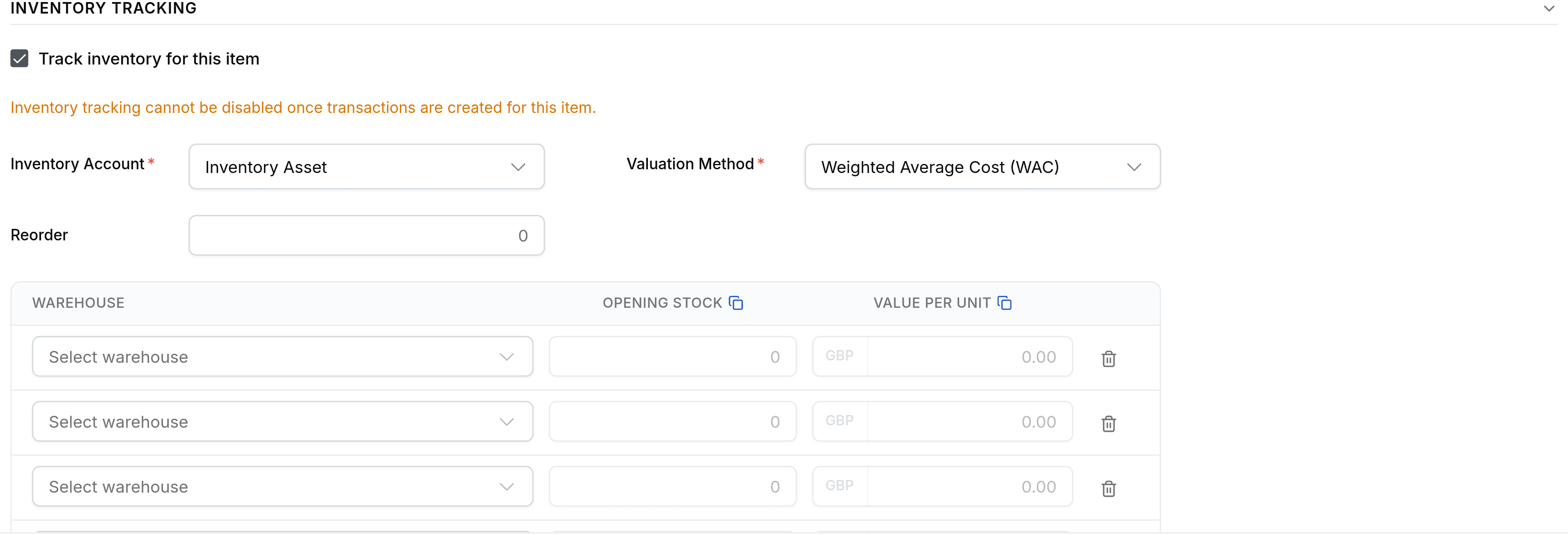
Opening stock is entered on the item form, per depot, with the value each unit is held at. That second column is the one to be careful about: it sets your starting valuation, and every margin you report afterwards is measured from it.
Count what you hold, per depot and per variant
Each variant holds its own stock, so a product with six variants is six counts.
Enter the quantity and the value per unit against a warehouse
A row with a quantity but no depot chosen is dropped when you save, silently. Pick the depot first.
Check the item's Warehouses tab against your count sheet
Before anybody transacts against it. The Activity Panel on the right records every movement afterwards, depot by depot.