
Attach a File
Two ways in: attach it to the record it is evidence for, or upload it into Documents on its own.
Most files should be attached to something. The upload route exists for the ones that genuinely belong to the workspace rather than to a transaction.
Attach it to a record
Open the record the file belongs to
A purchase receive, a shipment, a return, an adjustment, a bill or an item.
Use its attachment control and choose the file
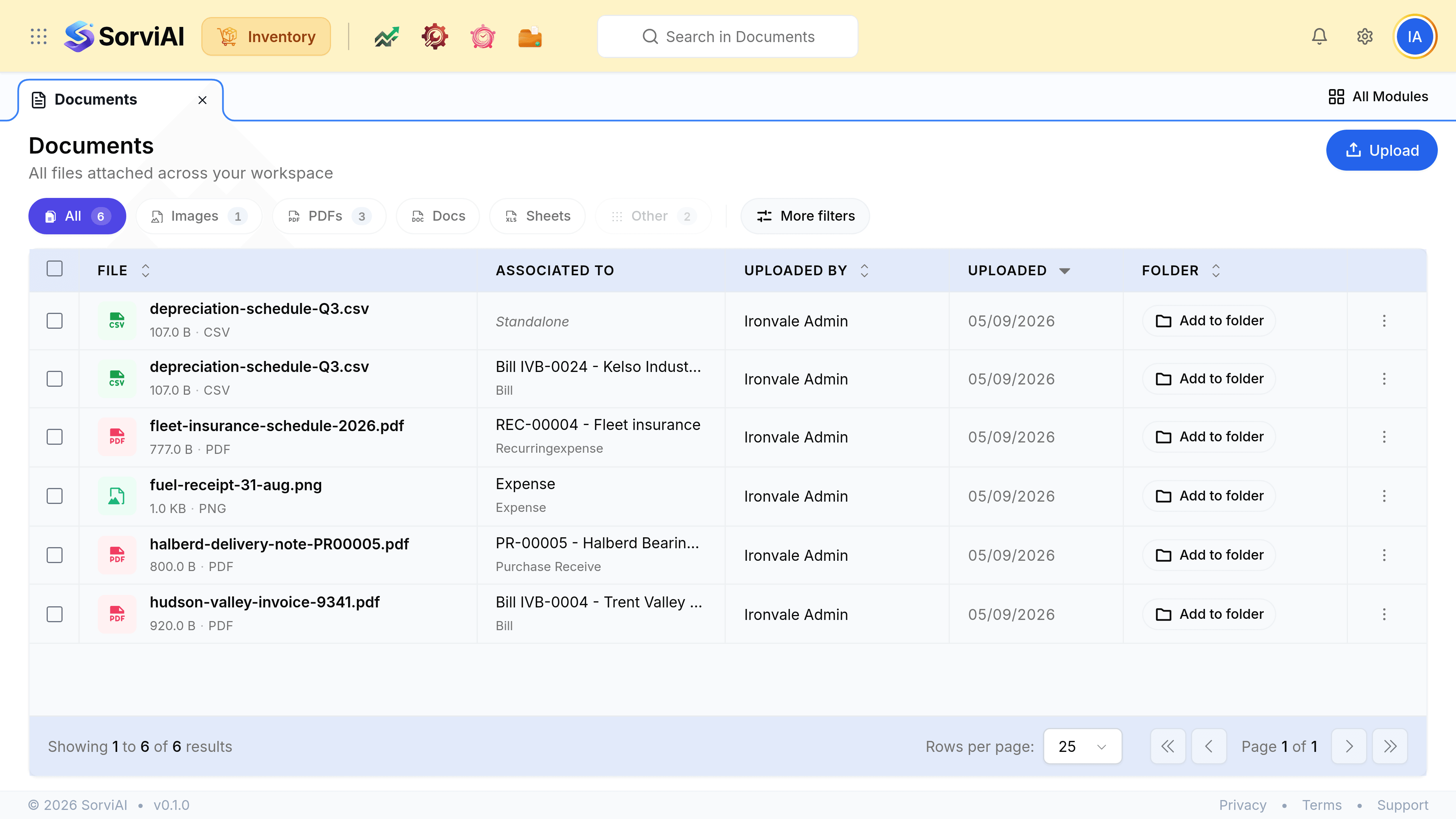
It appears against that record, and in the Documents list with the record named in Associated To.
Check it landed against the right record
The Associated To column is what makes the file findable later from three directions rather than one.
Or upload it into Documents
Upload at the top right of the Documents list opens your file picker and files it as Standalone: it belongs to the workspace and to no particular record.
Naming a file so it is findable
The list shows a file's name, its size and its type, and nothing else you did not put there.
| Name | Why it works or does not |
|---|---|
| halberd-delivery-note-PR00005.pdf | Names the vendor and the receive. Findable by either |
| hudson-valley-invoice-9341.pdf | Carries the supplier's own invoice number, which is what they will quote |
| fuel-receipt-31-aug.png | Says what it is and when. Enough for a standalone receipt |
| IMG_4471.jpg | Tells nobody anything, six months later or now |