
Skip to the article

The Inventory dashboard

Overview is the first screen Inventory opens on, and it holds no records of its own.

Every widget on it is a live read of the modules around it, arranged so that what needs a decision today sits above what is merely true.
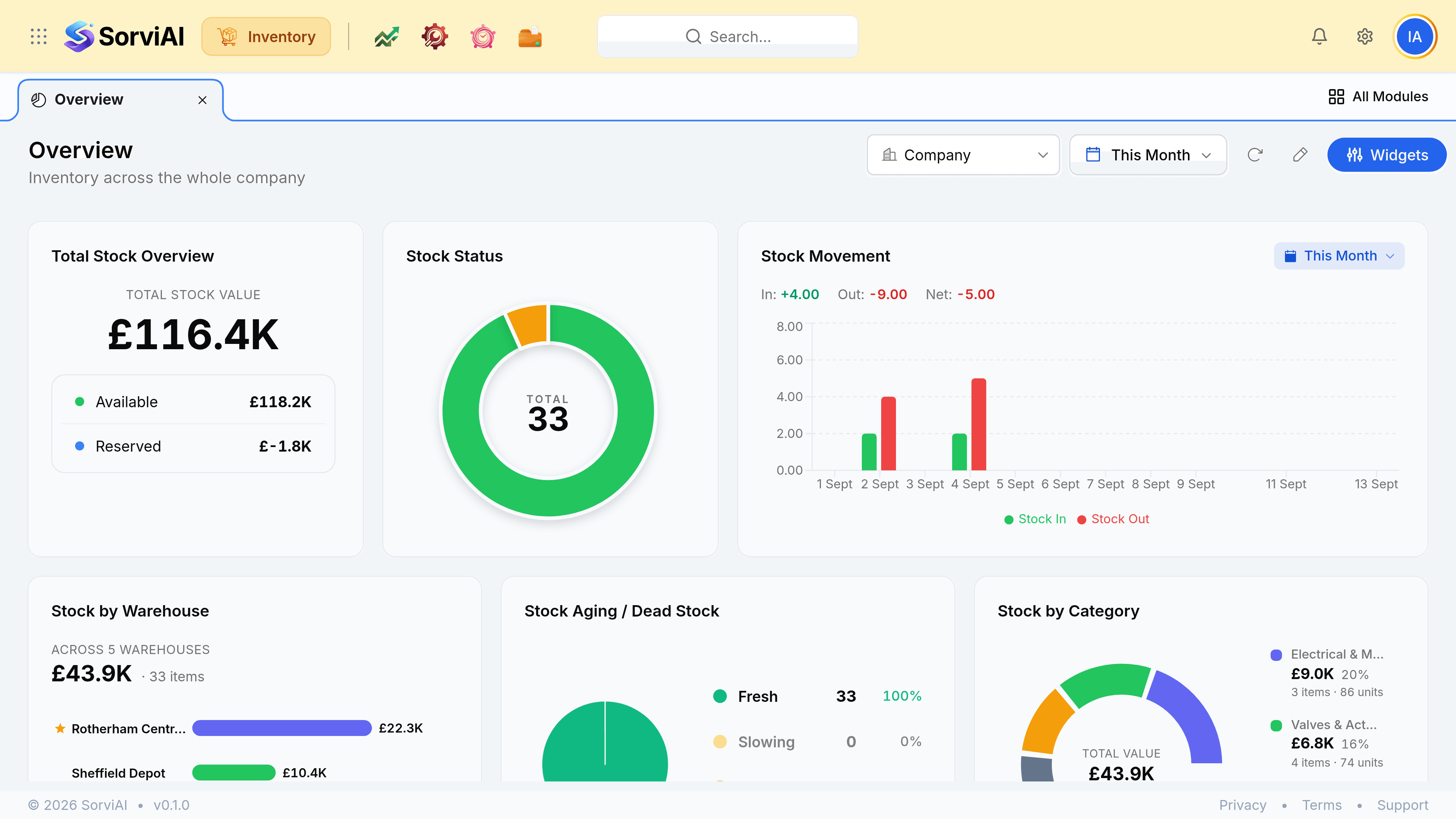
The Inventory Overview screen, subtitled Inventory across the whole company, with a Company scope picker, a This Month date range, a refresh control, an edit pencil and a Widgets button along the top. Total Stock Overview reads a total stock value of 116.4 thousand pounds split into available and reserved. Stock Status shows a donut totalling 33 items. Stock Movement charts stock in against stock out with In plus 4, Out minus 9 and Net minus 5. A second row holds Stock by Warehouse across five depots led by Rotherham Central at 22.3 thousand pounds, Stock Aging showing all 33 items fresh, and Stock by Category led by Electrical and Motors.
The first screen Inventory opens on. Every figure here is read from somewhere else.

What it answers, in order

Overview asks three questions and answers them top to bottom: what is the stock worth, what state is it in, and what has moved.

What it is worthvalue
Total Stock Overview splits the figure into available and reserved. Stock by Warehouse and Stock by Category break a total down by where it sits and what kind of thing it is.
What state it is inhealth
Stock Status counts the catalogue as in stock, low stock, out of stock or inactive. Stock Aging buckets holdings as fresh, slowing, stagnant or dead.
What has movedactivity
Stock Movement plots stock in against stock out. Recent Shipments, Receives, Packages and Stock Adjustments list the documents behind those bars.

The date range, and the ones that override it

A This Month range sits at the top right and governs the screen. Some widgets carry a second picker of their own, which wins for that widget alone.
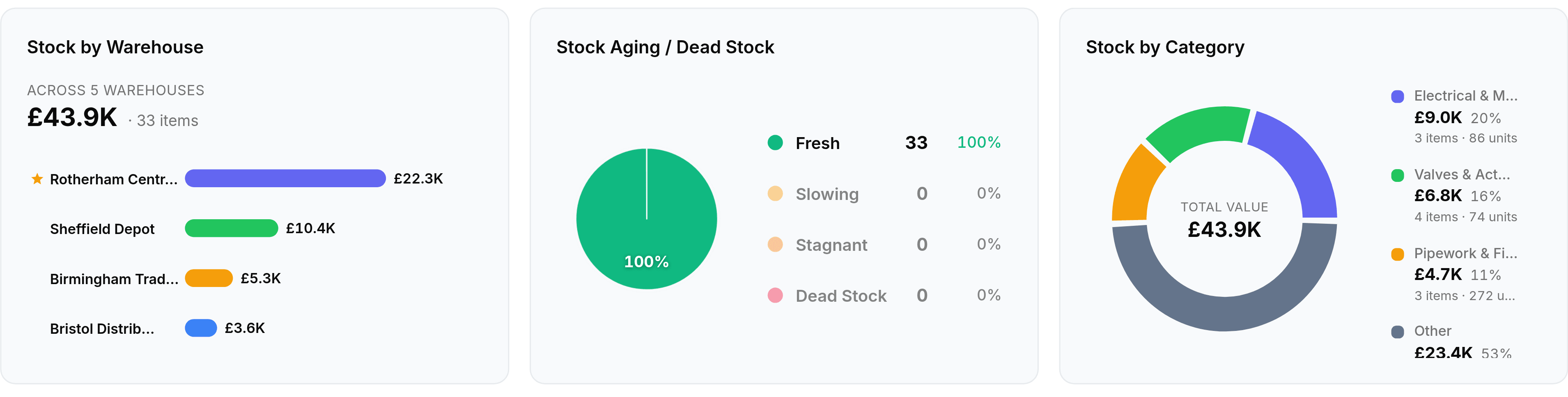
The second row of the Inventory dashboard. Stock by Warehouse reads across 5 warehouses, 43.9 thousand pounds and 33 items, with bars for Rotherham Central Warehouse starred as primary at 22.3 thousand, Sheffield Depot at 10.4 thousand, Birmingham Trade Counter at 5.3 thousand and Bristol Distribution Centre at 3.6 thousand. Stock Aging and Dead Stock shows 97 per cent fresh with 32 items, one slowing, none stagnant and none dead. Stock by Category totals 43.9 thousand pounds led by Electrical and Motors at 9 thousand.
Stock by Warehouse stars your primary depot. Stock Aging is the widget that finds what has stopped moving.

Overview never owns data

There is nothing you can only fix from this screen. Every widget is a shortcut into Items, Inventory, Sales or Purchases. If a widget disagrees with a report, trust the report and check the report's date range first.

Was this document helpful?