
Assign Training
Give a program to people, and start each of their deadline clocks.
Assigning is where a program becomes real work for somebody. Each assignment starts its own deadline clock from the day you make it.
Open the program and select Assign.
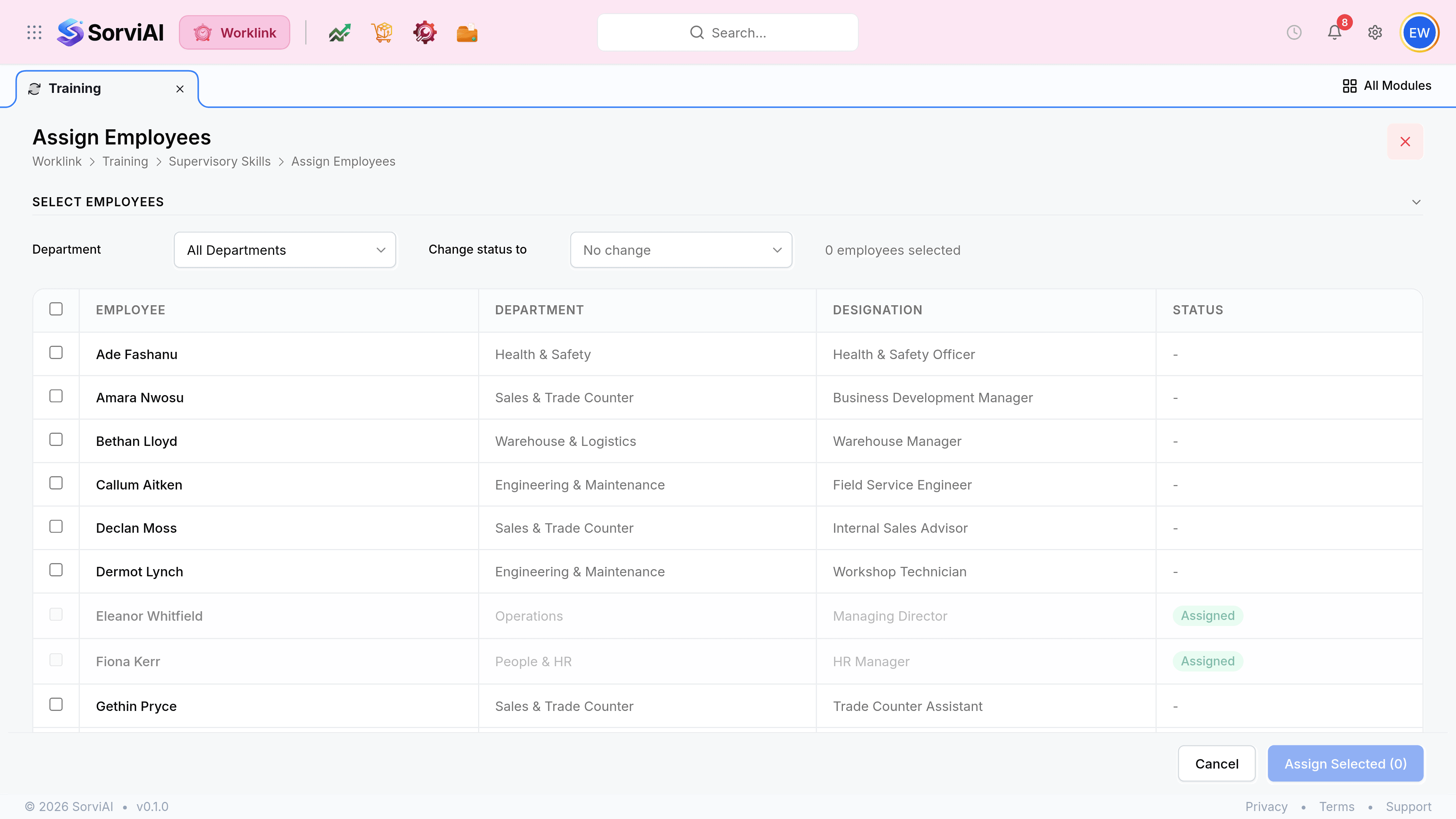
Search and tick the people. The search matches name, department and designation, so a whole team is usually one query.
Select Assign Selected. Everybody ticked gets the program, and their deadline starts today.
Who to assign, and how much at once
| Case | Approach |
|---|---|
| A mandatory course for everybody | Assign the whole roster in one pass. The count on the button is your check. |
| A new starter's induction | Assign on their first day, so the window starts when they can actually begin. |
| A role-specific ticket | Search by designation, such as Workshop Technician, and take the whole set. |
| A refresher for people whose certificate has lapsed | Assign the program again; a fresh assignment is how a renewal is recorded. |
What the person sees
The program appears in their My Training list straight away, with its modules, its tasks and the deadline you have just started. Nothing notifies them beyond that, so for anything genuinely mandatory an announcement alongside the assignment is worth the minute it takes.