
Introduction - Leave Approvals
The queue of requests waiting on a decision, and nothing that has already had one.

Leave Approvals is a worklist rather than a record. It holds requests that are waiting on you and drops each one the moment you decide it, so an empty screen means you are finished rather than that something is broken.
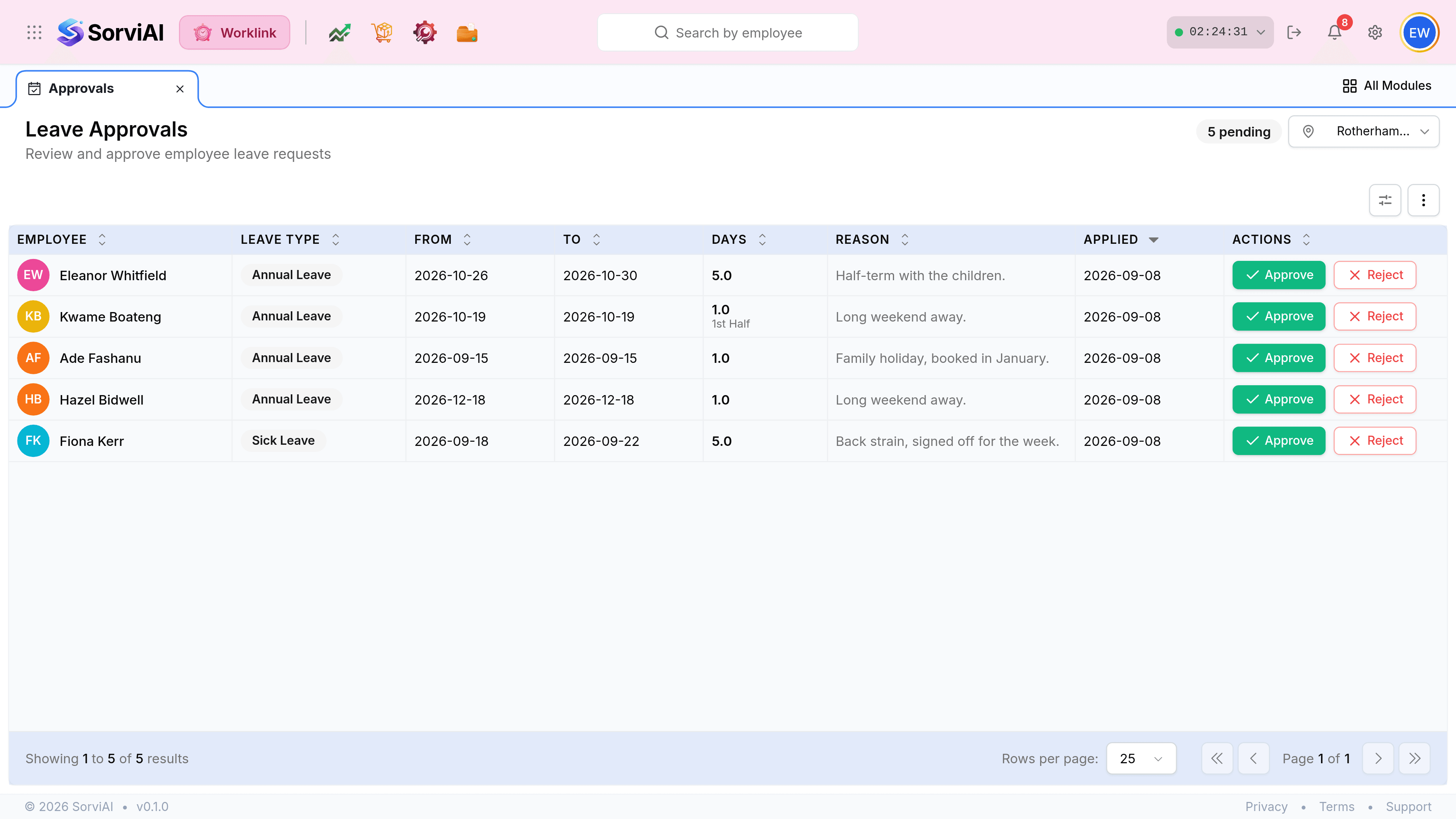
What is different about this screen
- No status columnthere is only one
- Every row is pending. A decided request is not here, which is why the column would say the same thing on each line.
- The pending counttop right
- How many decisions are waiting. It drops as you work and is the quickest read on the screen.
- Buttons, not a menuon every row
- Approve and Reject sit inline, because deciding is the only thing this screen is for.
- Leave type as a chipsecond column
- Rendered as a tag rather than plain text, so annual and sick separate at a glance.

The queue is scoped twice over
Two things decide whether a request reaches you, and only one of them is on screen.
| Scope | Set by | Effect |
|---|---|---|
| The depot | The location picker, by you. | Only people based at the selected site appear. |
| The reporting line | The organisation chart, not by you. | Only requests routed to you appear, whatever the picker says. |
| Permission | Your role. | Without the leave-approval permission the screen is not in your menu at all. |