
Move a ticket through its statuses
What each repair status means, and why the ticket and the work on it are tracked separately.
A status says where a repair has got to. Repairs tracks it in two places, and the distinction is the thing most worth understanding on this page: the ticket has a status, and so does every individual repair on it.
Highlights
- Twelve statuses ship with the product, grouped into five kinds.
- Each service row carries its own, so one fault can be done while another waits.
- Changing a status is one selection from the row, with no form in between.
- Every change is logged with who made it and when.
- The list can restatus many tickets at once from the bulk actions menu.
The five groups
Statuses are grouped by what they mean for the job, and the picker shows those groups rather than one long list.
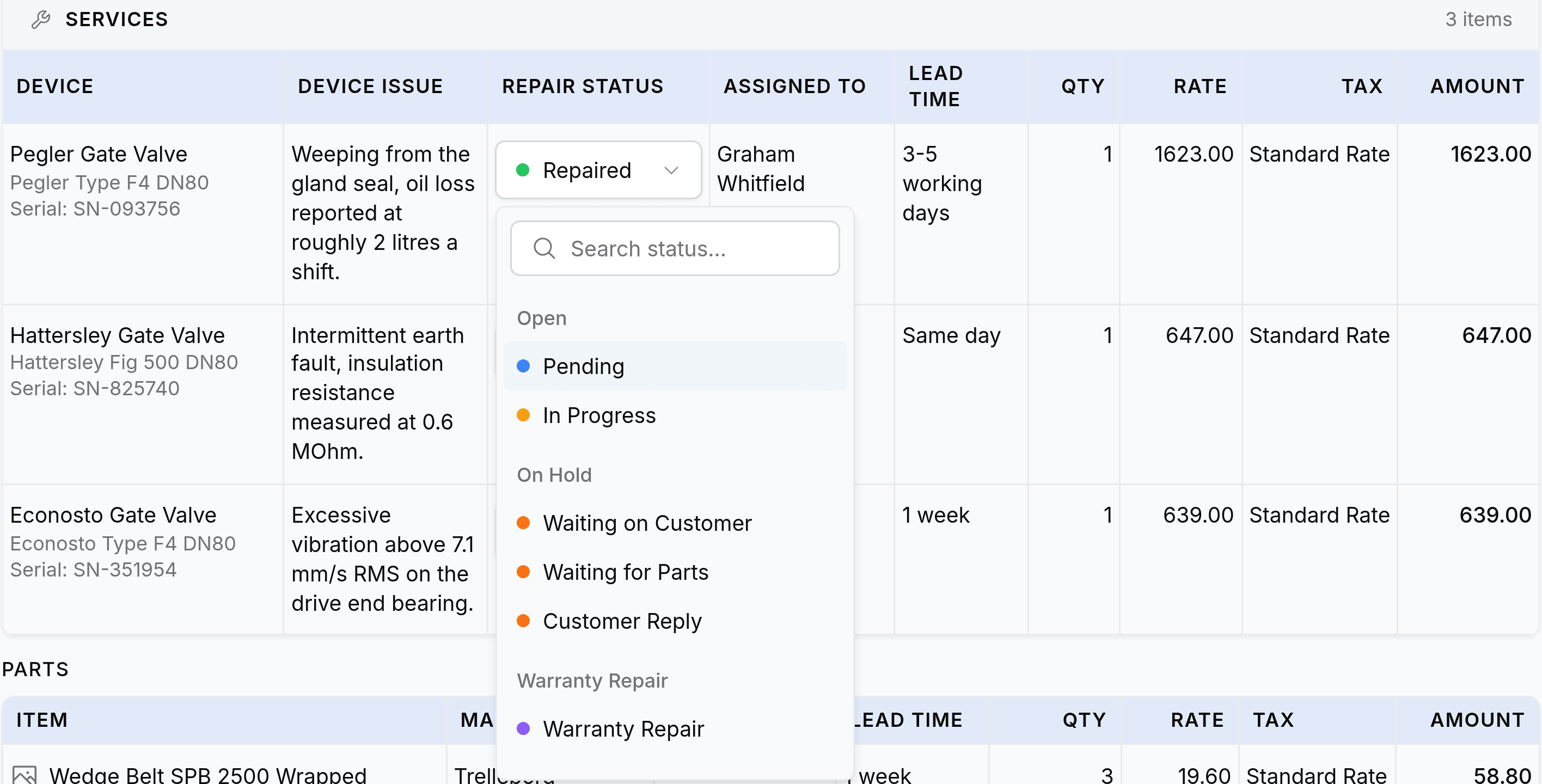
- OpenPending, In Progress
- The job is live and the workshop owns it. Pending is booked in and untouched; In Progress means somebody is on it.
- On holdWaiting on Customer, Waiting for Parts, Customer Reply
- Work has stopped and it is not your move. Each one names a different thing being waited on, which is what makes the hold answerable.
- ClosedRepaired, Completed, Unlocked, Repaired and Collected
- The work is finished. Repaired means it is fixed; Repaired and Collected means the customer has it back.
- CancelledCancelled, Disposed
- The job stopped and no repair happened. Disposed records that the equipment did not go home.
- Warranty repairWarranty Repair
- Work being done under warranty, kept separate so it can be counted and charged differently.
Change a status
Open the ticket and find the service row
Statuses live in the Repair Status column of the Services panel.
Select the current status on that row
The picker opens grouped, with a search box at the top.
Choose the new status
It applies immediately. There is nothing to save, and the change appears in the activity panel straight away.
Why the hold statuses are worth using properly
Three of the twelve mean "stopped", and reaching for the nearest one costs you the only report that can unstick a workshop.
| Status | What it means | Who moves next |
|---|---|---|
| Waiting for Parts | A component has been ordered and has not arrived | You, when the delivery lands |
| Waiting on Customer | The customer has been asked something and has not answered | Them |
| Customer Reply | They have come back to you and it needs reading | You, today |