
Adjust stock on a variant
Correct the on-hand figure for one location from the variant page, without leaving Storefront or opening the full adjustment sheet.
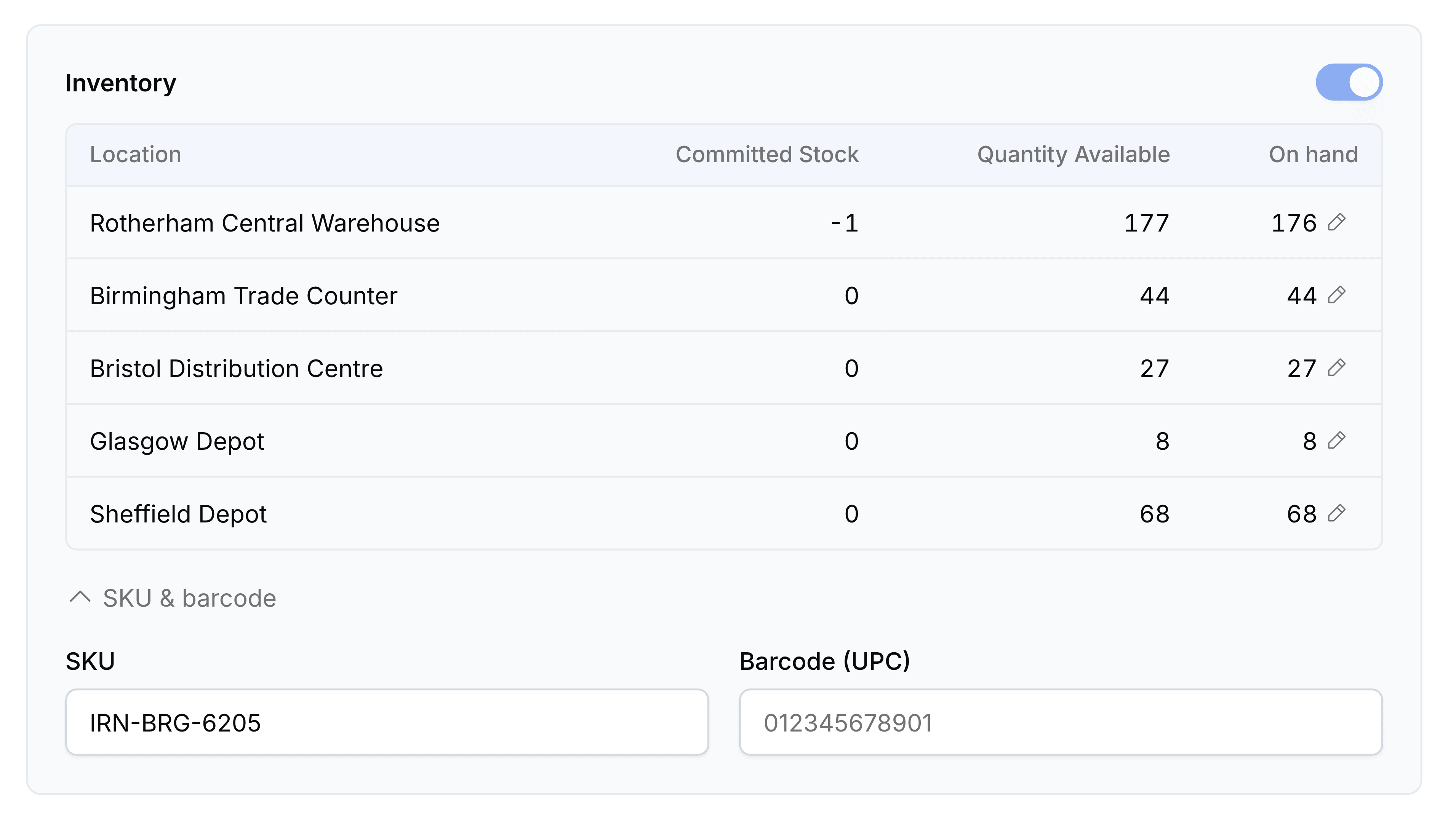
The Inventory card lists the stock held at each location, on a variant's own page and on a product that has no options. When a count is wrong, the pencil beside that row's On hand figure corrects it in place and posts a real stock adjustment behind the scenes, so the correction is recorded rather than quietly overwritten.
Correct an on-hand figure
Go to Products and open the product, or the variant if it has options.
In Inventory, find the location whose figure is wrong and select the pencil beside its On hand figure.
Choose Set to to enter the figure you counted, or Adjust by to enter the difference.
Enter the quantity, and check Warehouse, Reason and Account, which arrive filled in from your settings.
Select Confirm.
The on-hand figure updates, and so do Quantity Available and the totals above the table.
When the control is not there
- Inline adjust is turned off
- An administrator can turn it off for the whole organisation on the General screen of Storefront Settings.
- The product does not track inventory
- Nothing counts it, so there is no on-hand figure to correct. Services usually sit here.
- You are on a variant parent
- A parent is a grouping shell and holds no stock of its own. Open one of its variants and the Inventory card appears with it.